
HOQI - Virtual Staging AI
IntellaHouse & Home
0.00.00 Reviews
- Version
- 1.7.1
- Installs
- 10.00K
- Age Rating
- Everyone
Screenshots
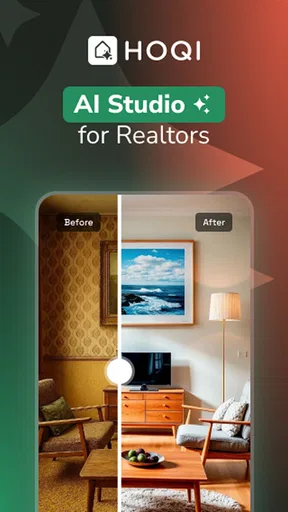
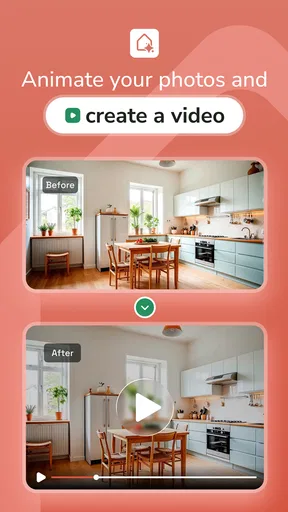
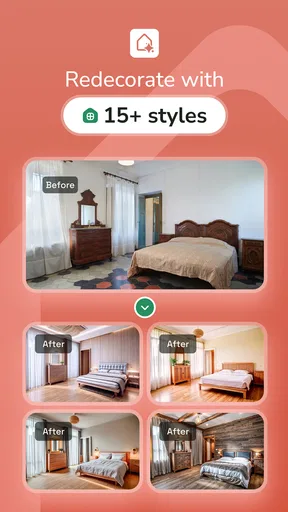
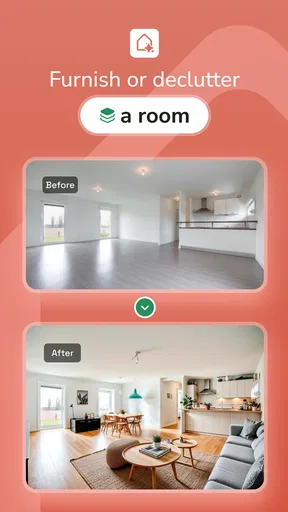
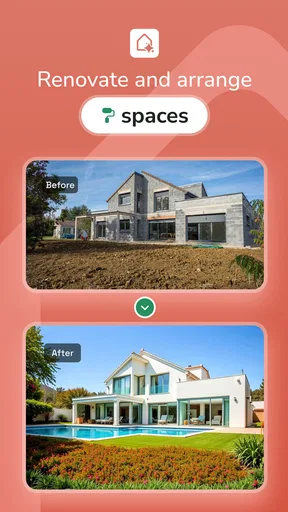
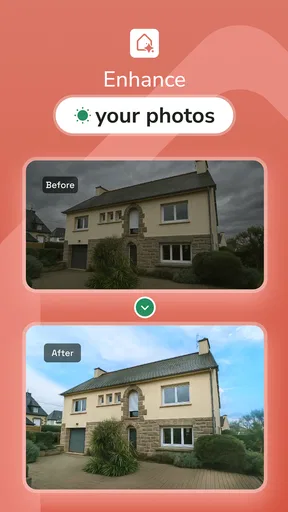
Our Review of HOQI - Virtual Staging AI
 Analysis by Appyee
HOQI - Virtual Staging AI caught my attention because it approaches home improvement from a practical angle: instead of treating redecoration as a game or a mood-board exercise, it is aimed at helping people visualize changes to a real house, garden, or apartment. I found that distinction important from the first session. The appeal is immediate when you have an empty room, an outdated corner, or a property that needs to look more inviting before a viewing. You can think through a new presentation without moving furniture, buying paint, or committing to a style you may regret.
That first impression is also where I noticed the app’s central challenge. Virtual staging is exciting when I am comparing possibilities, but its usefulness depends on whether those images lead to a decision. HOQI is most convincing as a visual planning tool for property owners, agents, renters, and anyone preparing a space for sale or improvement. It is less compelling if I only want endless decoration inspiration with no real room, garden, or apartment project behind it.
What the first week feels like
In my first week with the app, I treated it as a fast way to test presentation ideas. Rather than starting with an abstract wish such as “make the living room nicer,” I found it more useful to begin with a specific question: should this room feel brighter, calmer, more spacious, or more suitable for a particular buyer? That small change in approach made the results easier to judge. A visual transformation is only helpful when it answers a practical question.
The app comes from Intella and sits in the House & Home category. It is free to install, which makes experimenting relatively easy, while optional purchases range from $4.99 to $309.99 per item. I would not approach it as a completely costless design service. The sensible habit is to explore the free experience first, decide whether the visual output is relevant to your project, and only then consider spending money on a result that has a clear purpose.
One of the strongest early use cases is preparing a property for a conversation. If I were helping a family member sell an apartment, I could use a staged concept to discuss whether the room needs a warmer look, less visual clutter, or a more neutral presentation. That is more productive than arguing over vague descriptions. A buyer or relative can react to an image and say what feels wrong, which turns taste into something easier to discuss.
I also found the app more useful for empty or sparsely furnished spaces than for rooms already full of personal belongings. A crowded room gives any redesign a harder job because the visual message becomes mixed. A clean starting point makes the intended arrangement easier to read. This is a practical limitation rather than a flaw, but it changes how I would prepare an image before using it: remove distracting objects, straighten the scene, and choose a viewpoint that shows the room’s proportions honestly.
The best first-week workflow is to use HOQI for decisions, not decoration browsing. I would create a short list of questions before opening it, such as whether a neutral style suits a rental listing or whether a garden looks more usable with a clear seating area. This prevents the novelty of seeing alternative designs from taking over. It also gives each generated concept a job, making it easier to keep the useful ideas and ignore the attractive but impractical ones.
Useful for real rooms, not just inspiration
The app’s focus on real estate gives it a different feel from ordinary interior-design galleries. A gallery can show beautiful rooms, but it does not necessarily help me picture my own awkward doorway, narrow wall, or neglected outdoor area. HOQI is more grounded because the starting point is connected to a property I know. That makes the visual comparison personal, even when the result should be treated as a concept rather than a construction plan.
For a renter, the value is slightly different. I would use it to explore changes that do not require permanent work: furniture placement, color direction, lighting mood, or how an otherwise empty area might function. I would still check lease restrictions and actual dimensions separately. A convincing image can encourage an idea, but it cannot replace measuring the room or confirming that a proposed change is allowed.
For a property professional, the time-saving potential is easier to understand. A staged concept can help communicate the possible character of an unfurnished listing. However, I would be careful about presenting an edited vision as if it were the current property. The image should clarify what a room could become, not mislead someone about what they will see during a visit. That distinction protects trust and keeps the tool useful rather than merely decorative.
Where the novelty starts to fade
During the first few sessions, the transformation itself is satisfying. After that, I became more selective. Not every attractive arrangement is suitable for a real household. A design may look polished but leave too little walking space, ignore storage needs, or create a style that is difficult to maintain. This is where my review became less about visual surprise and more about whether the app helps me make a better choice.
I recommend comparing concepts by one variable at a time. For example, I would first decide on the overall level of warmth, then consider furniture direction, and only afterward think about decorative details. Changing everything at once makes it difficult to know what improved the room. This staged comparison is one of the more valuable ways to use the app because it turns a quick visual tool into a lightweight decision process.
Does it earn a place month after month?
HOQI’s recurring value depends heavily on how often a person deals with property decisions. Someone preparing several listings, renovating gradually, or managing multiple rooms may return to it regularly. For that user, the app can remain useful because each new space creates a fresh problem. A homeowner who completes one redesign and has no further project may find the appeal drops much faster.
I would not describe it as an app I need to open every day. Its natural rhythm is project-based. I might use it when moving, preparing a sale, planning a garden update, or reconsidering a room that no longer works for the household. That is not a weakness by itself; many useful home tools are occasional. The important question is whether the result saves enough uncertainty or effort to justify returning when the next project appears.
The current version is 1.7.1, and the app supports Android 7.0 and later. That broad compatibility makes it approachable for people using an older phone, although the quality of the experience will still depend on the device and on the images being worked with. The age rating is Everyone, so it is easy to regard it as a general household utility rather than a specialist professional package.
Its longer-term usefulness also comes from keeping a record of decisions outside the app. I would save the most convincing concepts alongside notes about room dimensions, existing furniture, estimated work, and household feedback. That creates a small planning archive. Without those notes, it is easy to forget why one version worked better than another and to repeat the same experiments later.
A realistic month-to-month scenario
Imagine that I am helping prepare a small apartment for rent. In the first month, I could use HOQI to explore a restrained living-room presentation and a more welcoming balcony or garden concept. I would then compare those ideas with the actual furniture budget and the amount of cleaning the space receives between tenants. The useful outcome would not be the most dramatic image; it would be the concept that makes the apartment feel orderly without creating a fragile setup.
The following month, I might return after seeing how people respond to the listing or after noticing that one area still feels empty. At that point, the app could help test a narrower adjustment instead of restarting the whole design. This is where virtual staging can earn repeat use: not by producing endless alternatives, but by supporting small, focused revisions as a property changes.
There is a trade-off, though. If the same room is repeatedly restyled without a clear decision deadline, the app can encourage hesitation. I would set a stopping rule, such as choosing the strongest concept after comparing a small handful of directions. Once the practical choice is clear, I would move to measurements, sourcing, cleaning, or photography. The app should shorten the path to action, not become another place to postpone it.
How it compares with familiar alternatives
The usual alternatives each solve a different part of the problem. A physical rearrangement shows the truth of the room but takes time and effort. A mood board is excellent for collecting colors and references, yet it may not show how those ideas fit a particular floor plan. A conventional interior-design service can offer deeper judgement, but it is less immediate and may be excessive for a single small change. HOQI occupies the space between those options: faster than physically staging, more personal than browsing inspiration, and lighter than hiring a full consultant.
That middle position is also its boundary. I would choose a measuring or floor-planning tool when exact dimensions, circulation, and furniture fit are the main concern. I would choose a human designer when the project involves structural work, complex lighting, accessibility, or a large budget. HOQI is better at showing a direction than proving that the direction is technically correct.
Compared with simply taking a new photograph after tidying, it offers more imaginative reach. Compared with a real photograph, however, a staged concept can hide practical problems. My preferred method is to use both: an honest current image to understand the starting point and a virtual concept to discuss the desired destination. Keeping those views side by side makes the app more responsible and more useful.
The maintenance burden behind the attractive image
The app itself appears easy to revisit, but the real maintenance burden belongs to the project it inspires. Every design choice creates upkeep. A pale, uncluttered room may photograph well but require frequent cleaning. A heavily decorated garden may look inviting while demanding more watering, pruning, storage, or weather protection. I found it important to judge each concept not only by its first impression but by what it asks of the person living there.
A helpful trick is to review a proposed design twice: first as a visitor seeing it for a minute, and then as the person who must live with it on an ordinary weekday. In the second view, I ask where shoes go, what needs wiping, whether children can move safely, and whether the arrangement leaves room for routine tasks. HOQI can start that conversation, but I have to supply the practical judgement.
This matters especially for real-estate presentation. A staged image can make a property feel more understandable, but long-term value comes from a setup that photographs well repeatedly, not only once. I would favor clear zones, flexible furniture, and a restrained visual identity over a highly specific style that may appeal to one viewer and alienate another. The app is most effective when I use its imaginative power with that restraint.
What may cause fatigue
The first source of fatigue is repetition. Once I have seen several versions of a similar room, the differences can feel less meaningful. The second is the gap between visual polish and physical reality. If I cannot translate an appealing concept into affordable, available, and maintainable changes, the excitement becomes frustration. The third is decision overload: too many possible directions can make a simple room feel like a permanent design project.
There is also a risk of judging a property only through presentation. A beautiful concept cannot repair poor ventilation, awkward access, insufficient storage, or a location that does not suit the intended resident. I would never use a staging result as a substitute for inspecting the actual home. The image is a communication aid, not a survey, renovation specification, or guarantee of market response.
Purchases deserve particular attention because the app is free to install but includes optional items priced from $4.99 to $309.99. That is a wide range, so I would avoid buying impulsively after seeing a pleasing result. Before paying, I would decide what the output will be used for, who needs to approve it, and whether a simpler photo, sketch, or physical test would answer the same question. This is especially important for casual users who may only need one idea.
Who should keep using it?
I think HOQI is a good fit for property owners who struggle to imagine change, agents who need a clearer way to discuss an empty space, renters exploring reversible improvements, and households that want to compare a few realistic directions before spending on materials. It is also useful for people who communicate better through images than through design vocabulary. Showing a concept can make a family discussion much quicker.
I would be more cautious recommending it to someone who needs precise architectural planning, detailed construction guidance, or guaranteed furniture dimensions. I would also skip it if I am looking only for a social feed of finished rooms or a deep catalog of products to purchase. Its value is tied to transforming a specific property into a clearer visual decision, not to replacing every other home-improvement resource.
Because it is free and rated for Everyone, trying it is straightforward for a broad audience. Still, “easy to try” does not mean “right for every project.” The best results come from entering with a real space, a defined goal, and a willingness to verify the concept in person. Without those three things, the app can feel like a pleasant visual diversion rather than a useful household tool.
My long-term verdict
After the novelty fades, I see HOQI - Virtual Staging AI as a focused utility with occasional but genuine staying power. It does not need to become a daily habit to justify itself. Its lasting value comes from helping me move from “I cannot picture this room differently” to “I can compare a few directions and decide what to investigate next.” That is a modest promise, but it is a meaningful one when a property decision feels uncertain.
I would keep it available for moves, listings, room updates, and outdoor refreshes, while resisting the urge to treat every generated concept as a plan. My strongest recommendation is to pair each visual experiment with a practical check: measure the space, estimate upkeep, consider the people using it, and compare the idea with an honest photograph. That workflow protects against the app’s biggest weakness, which is making a possible future look easier than it may be to create.
For me, the app earns lasting space when it is used as a bridge between imagination and action. It is not a replacement for a designer, a measuring tool, or real-world inspection, and users should think carefully before purchasing optional items. But for someone preparing a house, garden, or apartment and needing a quick, concrete way to discuss redecoration, HOQI is worth trying before committing time and money to the wrong direction.
Verdict
Strengths of HOQI - Virtual Staging AI
- Creates realistic room makeovers from listing photos in minutes.
- Offers multiple furnishing styles for different property types.
- Helps buyers visualize empty rooms more easily.
- Useful for agents, sellers, and property marketing campaigns.
- Can make basic listings look more polished without a designer.
Limitations of HOQI - Virtual Staging AI
- Results may include distorted furniture or unrealistic room proportions.
- High-quality edits may require a subscription or paid credits.
- AI can alter important architectural details in the original photo.
- Limited control over exact furniture placement and decoration choices.
- Results depend heavily on the lighting and quality of uploaded images.
Similar Picks in This Category
View All
Universal TV Remote Control
CodeMatics Media Solutions3.9

AlfredCamera Home Security app
Alfred Systems Inc.4.7

Planner 5D: AI Home Design
Planner 5D4.5

Universal Tv Remote-Cast to TV
One Music Player4.1

Zillow: Homes for Sale & Rent
Zillow Group4.8

99acres Buy/Rent/Sell Property
infoedge.com4.3
Frequently Asked Questions
What is HOQI - Virtual Staging AI and what can it do?
HOQI - Virtual Staging AI is designed to help users furnish and decorate empty interior spaces using artificial intelligence. You can upload a photo of a room and experiment with different furniture arrangements, decorative styles, and visual concepts. It is especially useful for homeowners, real-estate agents, property managers, and designers who want to create attractive staging ideas without physically furnishing the property.
How do I create a virtually staged room with HOQI?
After opening HOQI, you generally begin by uploading or taking a clear photo of an empty or lightly furnished room. The app then analyzes the space and lets you select a preferred design direction, such as modern, minimalist, classic, or another available style. Processing time may vary depending on the image and service load. For the best results, use well-lit photos with the floor, walls, and room layout clearly visible.
Are the images generated by HOQI suitable for real-estate listings?
HOQI can be useful for producing presentation images for property marketing, social media, planning, and early design discussions. However, AI-generated staging should be treated as a visual concept rather than an exact representation of the property. Furniture proportions, lighting, colors, or architectural details may not always be perfectly accurate. Before publishing an image, review it carefully and make sure it does not mislead potential buyers or renters.
Does HOQI - Virtual Staging AI require payment or offer in-app purchases?
The availability of free generations, premium designs, export options, or other features may depend on the current version of HOQI and the platform where it is downloaded. Some AI applications provide limited access for free and reserve higher-quality results or additional edits for a subscription or one-time purchase. Check the app’s store listing and payment screen carefully, including renewal terms, before confirming any subscription or purchase.
What should I know about privacy when uploading room photos to HOQI?
Before uploading images, review HOQI’s privacy policy and the permissions requested by the app. Room photos can contain personal information, family belongings, addresses, documents, or identifiable views through windows, so remove sensitive details whenever possible. Also check how uploaded images are stored, processed, and deleted, and whether they may be used to improve artificial-intelligence systems. Avoid submitting photographs that you do not have permission to use.
